Godot Wild Jam #80 Retrospective
by Maxwell Koo· · 14 min read
Back in April, I participated in the Godot Wild Jam #80, a 10-day long game jam exclusively for games created with the Godot game engine. This made for quite a hectic week-and-some, but I’m happy to say that I was able to finish a game in time! Now that things have settled down a bit, I’m finally able to reflect on the experience and share some thoughts.
Let’s Jam
The theme for this jam was “Controlled Chaos”, with the optional “wildcards”:
- “Show, don’t tell” (Use no text in the game)
- “I am… wait, what?” (Every character has a ridiculous name)
- “Simple shapes” (Everything is made of simple shapes)
My entry was a game called Defrag, a first person wave-based shooter where you use a variety of weapons to survive increasingly difficult waves of enemies.
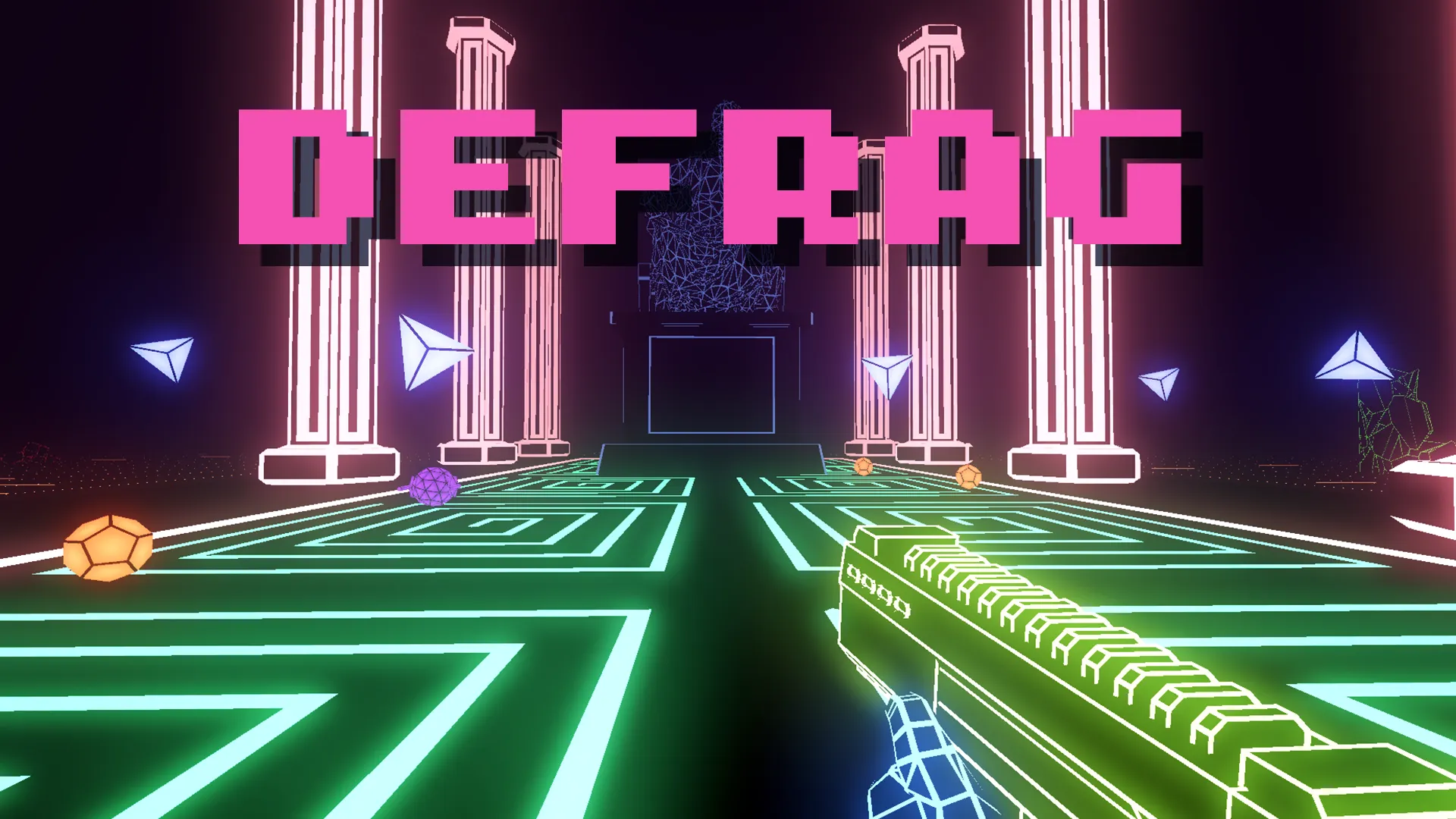
I wanted to create a first person shooter, as the challenge of creating a solid-feeling shooter in a jam timeframe was very appealing to me. Given the popularity of the genre, player expectations for polish are high, and the nuances that can elevate or sink a shooter have interested me for a long time. I didn’t end up with something I’m fully satisfied with, but I did learn some valuable lessons to take forward to next time.
Aesthetic
Inspired by the wildcard of “simple shapes”, I decided to create a neon aesthetic utilizing lots of saturated colors and bloom. I was also inspired by the fantastic art of the game Paradox Vector, which really has a great use of colors and patterns in the “vector graphics” style.
Overall I was happy with the way the graphics turned out, and graphics ended up being my best-rated scoring category. I received quite a few questions about how I achieved certain effects, so I will try to break down the highlights here.
General Technique
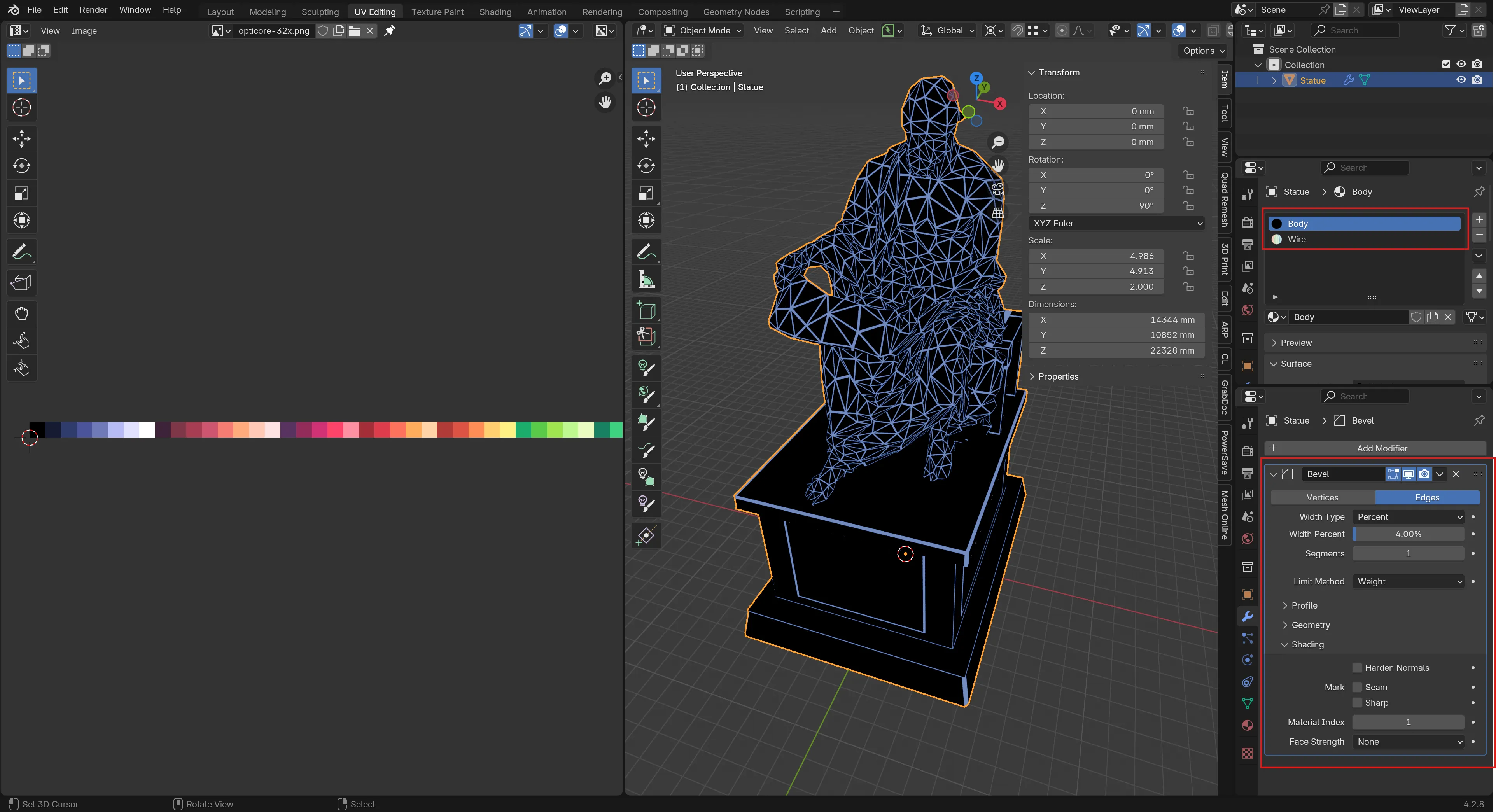
In general, all the 3D models in the game were created with:
- A low poly base model
- An unshaded black base material
- A neon material, with an emissive shader pulling color from a palette texture
- Either a Bevel or Wireframe modifier in Blender, to generate edge geometry
- Which was used where was determined situationally, for instance animated meshes deformed better with the Bevel modifier
- A material offset applied in the above modifier to select the neon material for our edges
Some manual tweaking was done for some meshes to include or exclude specific edges from the modifier, this was largely done via tweaking an edge’s Bevel Weight in Blender.
This isn’t necessarily the most efficient way to achieve this effect, but it was quick and easy to adapt on top of the CC0 assets used in the game, which saved time. The extra geometry and material really shouldn’t be that expensive given the low-poly nature of the assets.
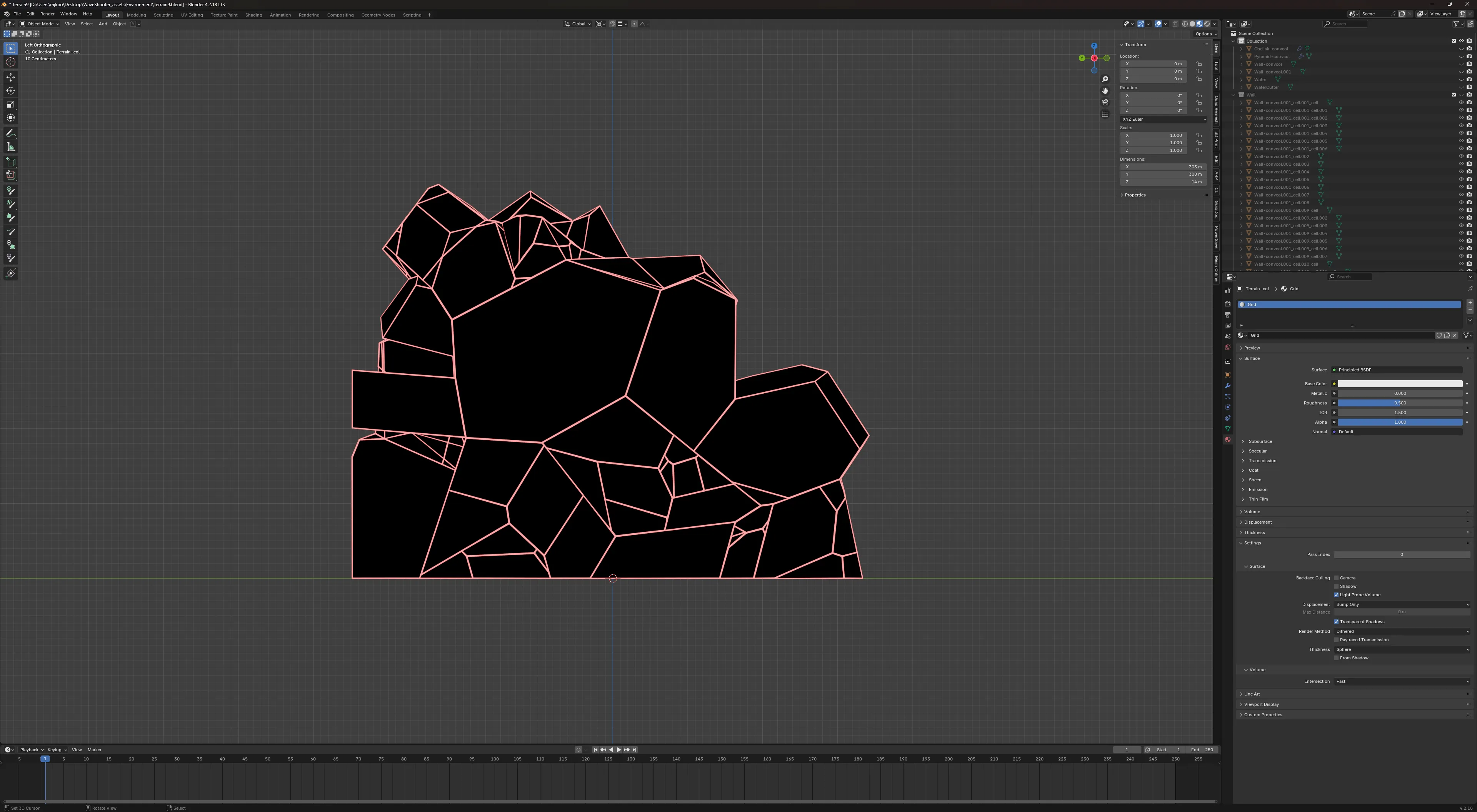
Here you can see an overview of the setup for the large statue mesh in the temple:
Environment
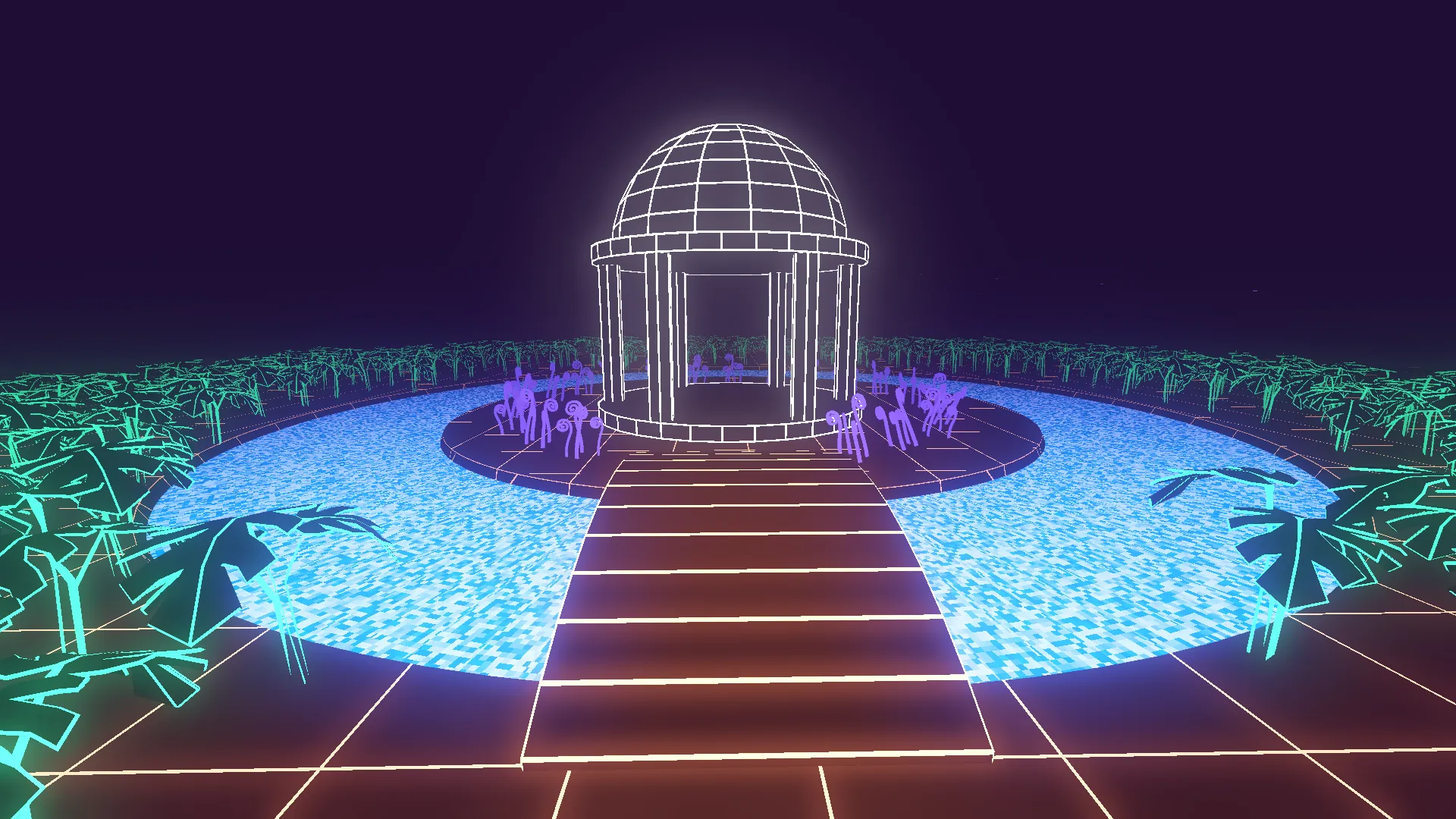
Here is a wider-angle overview shot of the map, with some of the effects tuned down for readability:
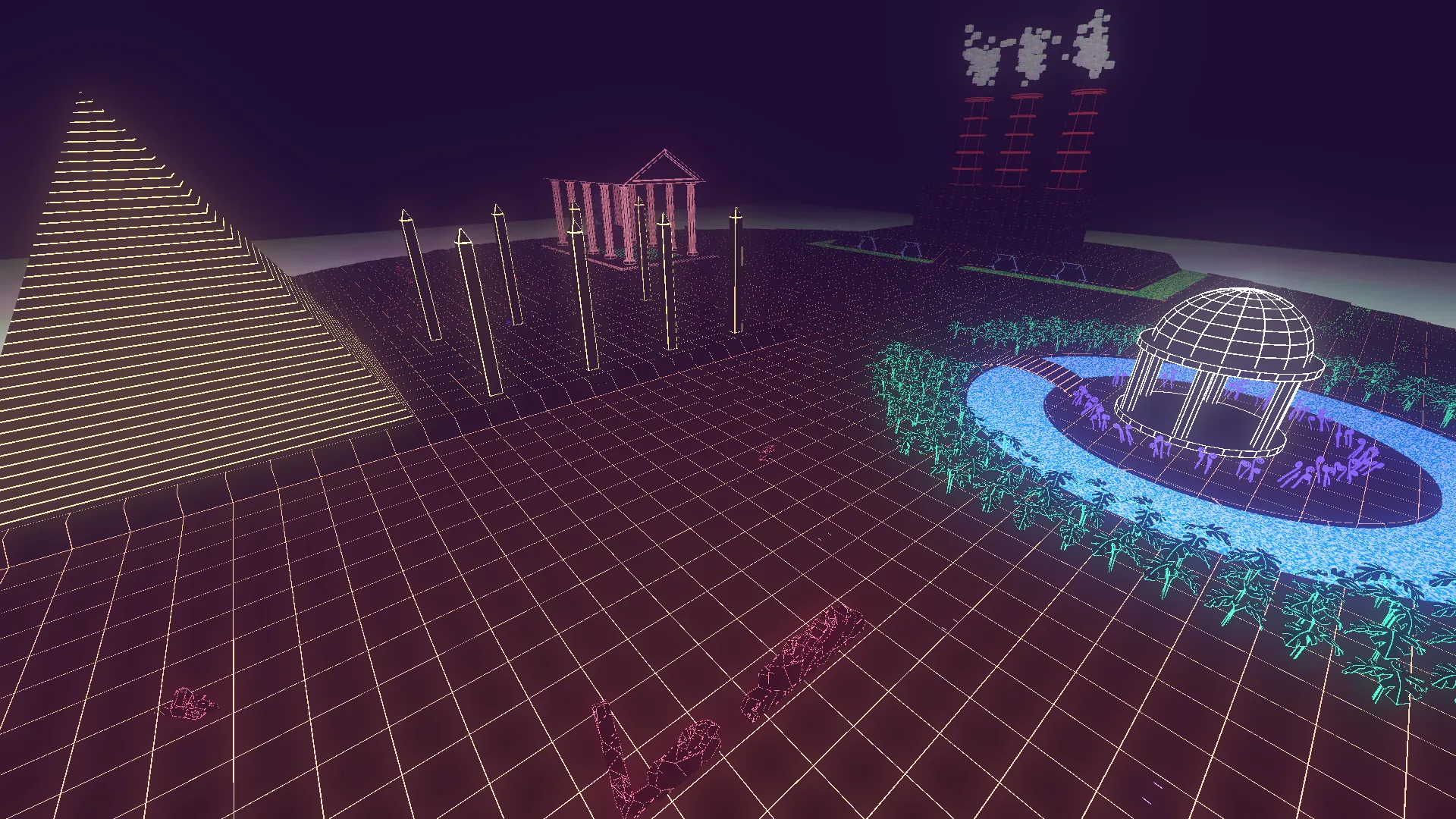
The level is split into four zones, each representing a different concept: government, religion, industry, and nature. There isn’t a super deep meaning behind this - the idea was to frame the world around a tension between different structures of power, each represented by simple shapes with strong pre-existing associations. The playable area sits at the intersection of all four, a kind of liminal no-man’s-land filled with scattered ruins.
The environment was largely done in wee hours of the morning on the submission date, before this I literally just had a ground plane and some CSG walls! This ended up being quite a crunch .
Basically everything is a mesh generated with the above workflow. An exception is the actual ground geometry and the factory building, which have a world space triplanar-projected grid texture applied as a shortcut.
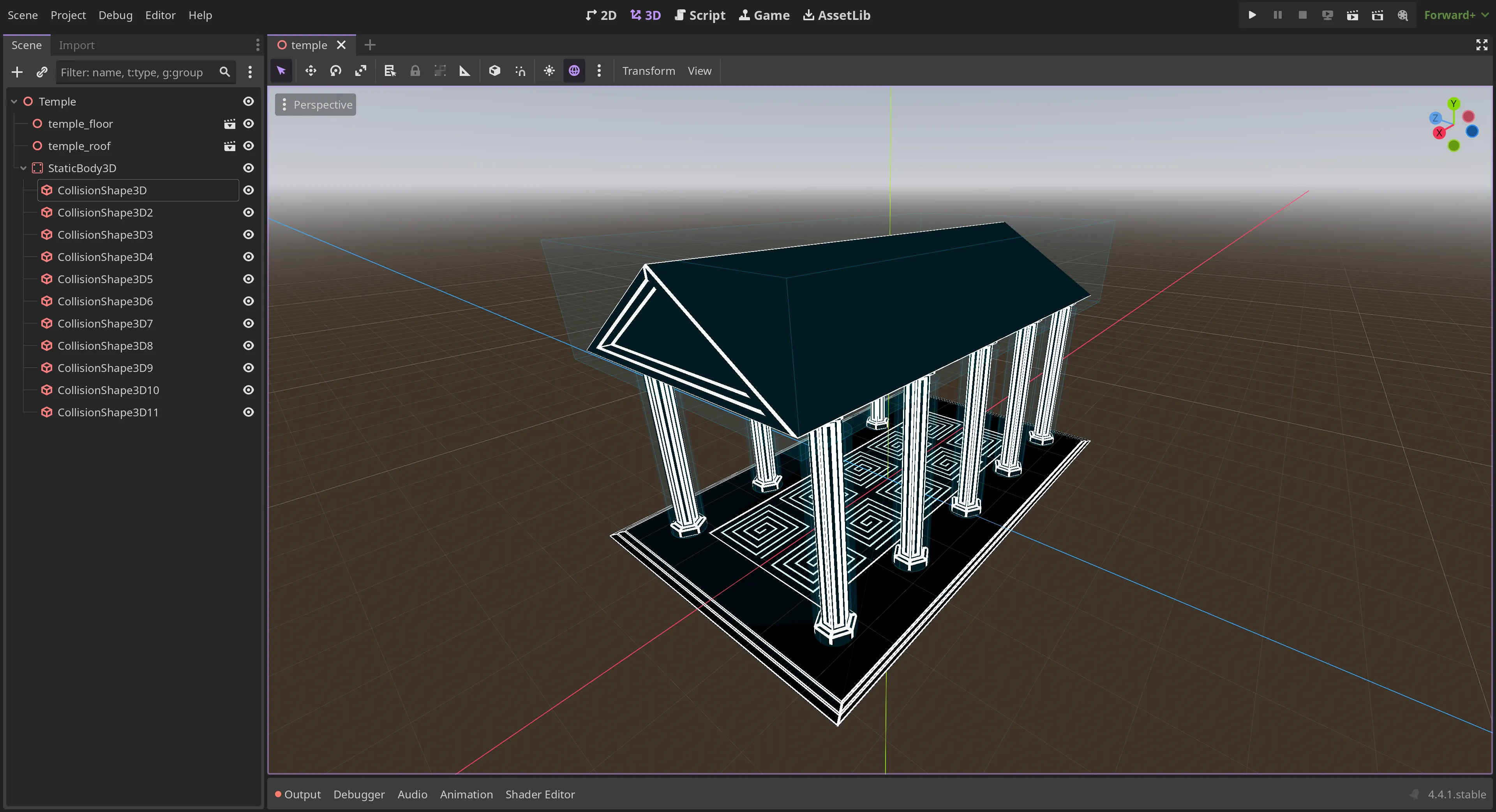
Mostly I used Godot’s automatically generated ConvexPolygonShape3D shapes for speed, but for items like the buildings you can enter and the pillars I manually defined some better collision shapes.
Proton Scatter came in handy for placing items like the plants around the gazebo area. The remainder of the props were placed manually.
The broken walls were generated via the Cell Fracture Blender addon, by fracturing a cube, deleting some chunks, joining it together again and applying a bevel as above. The effect I think came out looking pretty good, and I was able to kitbash these together/clip these strategically through the ground at odd angles to give the impression of destroyed buildings in the map outskirts. In my haste, at least one large section of these walls were totally missing collision though (but that’s skipping ahead to the Bugs section).
World Environment
The world environment settings were crucial for achieving the desired atmosphere. A heavy bloom effect makes the neon edges glow intensely against the dark background. Volumetric fog serves a gameplay purpose by gradually obscuring distant enemies, preventing players from sniping across the entire map. A subtle ambient light ensures players can still navigate the darker areas without losing the high-contrast aesthetic.
Effects
Beyond the base black and emissive neon shaders applied to the majority of the geometry, a few extra shaders were used for effects.
For instance, I tweaked Quokt’s pixel water shader for the pond and the industrial sludge in the factory. With some tweaked colors and parameters I think this fit quite well, and the shared “pixel” look for liquids provided some visual cohesiveness.
The “lava” on the boundary of the map denoting the kill zone was a custom visual shader made from plugging panning noises into the emissive color. A similar effect was used for the particles emitted by damaged enemies. Intended to contrast with the rest of the dark level, the bright shimmering white-with-modulating-colors look was meant to indicate “danger” to the player. The shimmering kill zone boundary provides clear visual feedback about the playable area limits.
The EMP blast visual uses a custom shader derived from thelastflapjack’s lightning ball shader, combining two layers of panning noise textures modulated by sine and cosine waves over time. The shader renders as unshaded with culling disabled, with an emission multiplier parameter ramping up as the sphere expands.
Weapons
The weapon system was built around a modular architecture with a base Weapon class that each weapon extends.
This made it easy to add new weapons during the jam while maintaining consistent behavior.
Viewmodel Shader
One of the concerns when rendering first-person weapons is preventing them from clipping through walls etc. when the player gets too close to geometry. There are a few commonly used tricks for solving this issue, including a popular one of rendering viewmodels to a separate viewport and compositing them on top of the rest of the scene. After researching this quite a bit, I think that the shader solution used in majikayogames’ FPS controller was the most elegant solution for this game, and I adapted this shader for this project.
The shader performs two key operations:
- Adjusts the field of view specifically for the viewmodel (set to 35° in-game, independent of the main camera FOV)
- Mixes the viewmodel’s depth toward the near plane (0.9 mix factor), preventing wall clipping
Notably, the depth mix accounts for Godot 4.3’s reverse-Z depth buffering by mixing POSITION.z toward POSITION.w rather than toward 0.0, so that after perspective division the depth lands near 1.0 (the near plane in reverse-Z).
I adapted the shader with material parameters specific to our setup, including emission and backlight support.
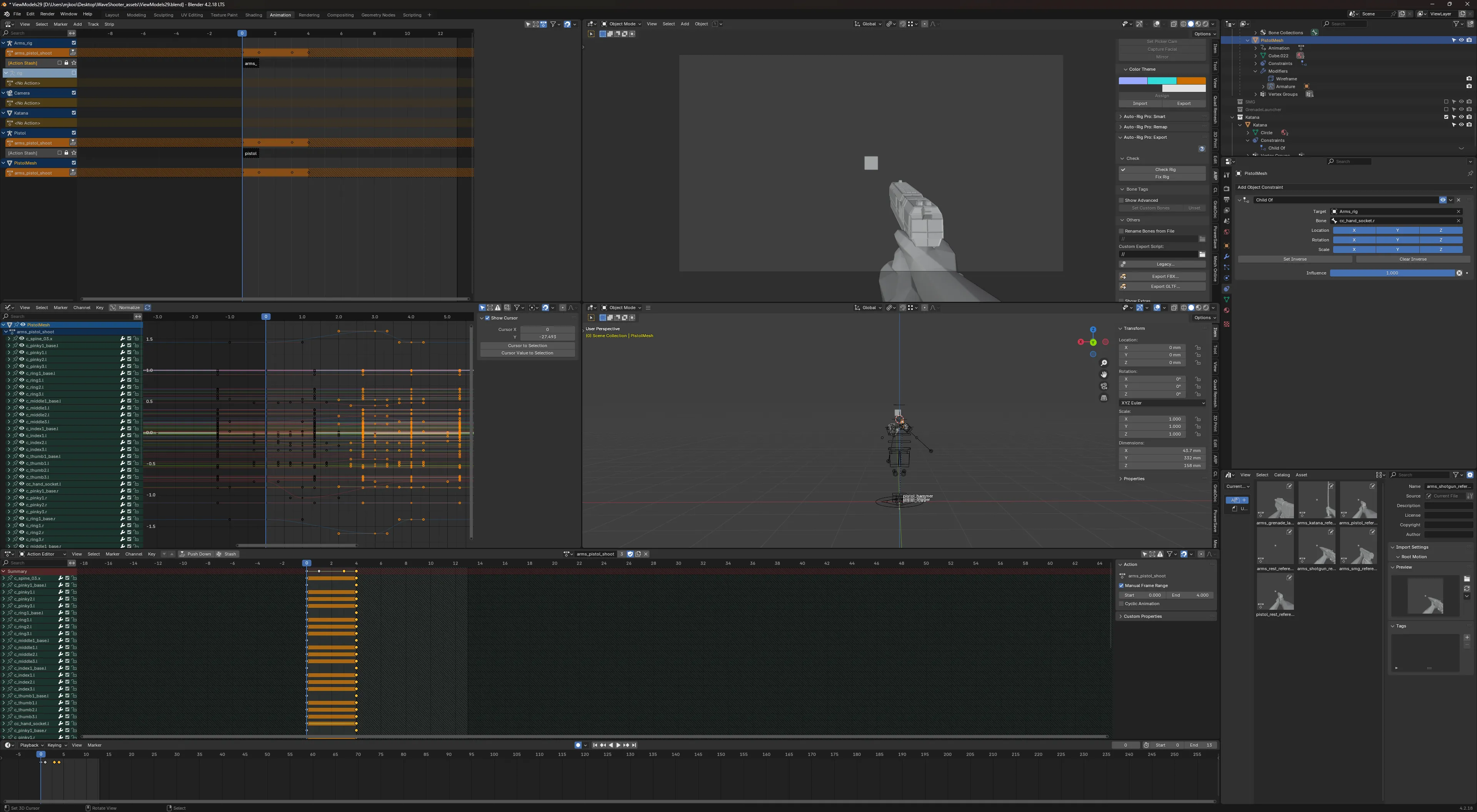
Having separate control over the viewmodel FOV was extremely helpful for creating first person animations for the weapons and arm models. I was able to set up a camera with identical FOV in Blender and animate using camera view, easily matching the look in-game while still allowing control of the main camera FOV independently for gameplay.
Projectiles
The pistol, SMG, shotgun, and grenade launcher are all projectile-based - I think physical projectiles just “feel better” for games like this compared to hitscan. The katana is a melee weapon, but its secondary fire can deflect incoming enemy projectiles, turning them into player bullets fired back at enemies.
The visuals of bullets are rendered separately from the actual bullet collider. Bullets are emitted down the camera ray from the crosshair, and the visual model uses an exponential interpolation curve to smoothly converge onto the collider position over the course of the trajectory. It seems like this system works reasonably well, but playtesters did mention feeling like they were slightly off.
All projectiles use the modular damage system through HitBox and HurtBox components backed by a Health node, making damage calculation consistent across weapon types.
Explosions have radial damage with inverse-square falloff and knockback applied to any physics body in range. The grenade launcher in particular can be used to boost the player substantially, since the knockback adds directly to the player’s velocity. Combined with bunny hopping, you can end up moving pretty fast!
Enemies
Three enemy types provide variety in combat encounters:
- Tetras: Flying pyramid enemies with boid flocking behavior. When a raycast detects the player, they break from the flock and charge directly at their target, dealing contact damage.
- Ticks: Fast enemies that chase the player. When they get close enough (or when killed), they begin a 1.5-second detonation sequence. Their emissive shader multiplier tweens up as a visual warning before they explode.
- Soldiers: Sphere-bodied ground enemies with a turret. When they have line of sight within range they switch to strafing laterally while firing from dual bullet emitters. The sphere visually rolls based on movement speed and direction.
Waves
The wave spawner introduces enemy types gradually: wave 1 is Tetras only (8 of them), Ticks join at wave 2, and Soldiers arrive at wave 3. Each type scales linearly per wave:
wave × 8Tetras (capped at 1024)(wave - 1) × 4Ticks (capped at 256)(wave - 2) × 2Soldiers (capped at 64)
Enemies spawn on random navmesh points at least 35 units from the player, and the next wave triggers 5 seconds after the last enemy is eliminated.
Flocking
The Tetra enemies use a boid flocking system for emergent group behavior. Each boid calculates its movement based on several weighted factors:
- Separation (avoid crowding neighbors)
- Alignment (steer towards average heading of flockmates)
- Cohesion (steer towards average position of flockmates)
- Target seeking (move towards the player)
- Collision avoidance (physics queries using 24 Fibonacci-sphere-distributed probe directions)
- Thermals (noise-based height variation for natural movement)
The system uses a hybrid approach: basic boid calculations happen in GDScript, while the expensive O(n²) neighbor queries are accelerated using a compute shader. I was inspired by the video by Sebastian Lague and his Unity implementation of similar ideas. The compute shader processes up to 1024 boids in parallel, calculating separation headings, flock headings, flock centers, and flockmate counts for each boid, which are then read back to the CPU for the per-boid steering calculations.
The flocking creates natural-looking swarm behavior where enemies move as a coordinated group while still pursuing the player. The thermal system adds vertical variation, preventing the flock from moving in a flat plane.
Gameplay Systems
Movement
The player movement system is based on majikayogames’ SimpleFPSController, modified for this project. It implements Quake/Source-style air strafing with a high air acceleration value, allowing experienced players to gain speed through diagonal air movement. Auto-bunnyhopping is enabled by default, so holding jump will automatically re-jump on landing and preserve momentum.
Ground movement uses a friction-based model. Combined with the grenade launcher boost, skilled players can achieve very high speeds, though a lot of players likely never discovered this.
Resource System
Rather than using ammo pickups, all resources regenerate passively after a 3-second cooldown triggered by use. Each weapon has its own ammo pool and regeneration rate: the SMG regenerates fastest at 8 rounds/second while the grenade launcher is slowest at 0.25/second, creating an incentive to switch weapons often. Health also regenerates after a 3-second cooldown following damage.
The EMP ability charges through a different mechanic: it builds passively as the player deals damage, at a rate of 1 charge per 2000 damage dealt, storing up to 3 charges total. This rewards aggressive play and creates a satisfying feedback loop: the more damage you deal, the sooner you can unleash a screen-clearing blast.
Leaderboard
The game uses SilentWolf as a cloud leaderboard backend. On game over, a composite score is calculated from weighted stats:
- Waves survived (10,000 pts/wave)
- Kill counts (50-200 pts depending on enemy type)
- Damage dealt (10 pts/damage)
- Time alive (10 pts/sec)
- Penalty for damage taken (-5 pts/damage)
Player names are run through a profanity filter before submission, and all individual stats are sent as metadata alongside the composite score.
Reflections
What went well
This is my best attempt at a first person shooter to date. I went with an art style I knew I’d be able to pull off, both in creating custom assets and adapting public domain assets to fit. Re-using and adapting existing solutions such as a solid first person controller let me go from zero to functional fairly quickly. In the end the core gameplay feels fairly tight in my opinion, given the conditions it was developed under.
I was able to experiment with some new concepts, like the flocking system for the Tetra enemies. This was my first time using compute shaders in Godot, and I found it fairly easy once the correct ceremony is done for setup. It definitely helped to have a Unity implementation to reference and modify.
The leaderboard system I think was quite a success. It was relatively easy to implement, and it was definitely a driver for folks who did check out the game to try to hit the top of the leaderboard. I’m pretty sure my own high score was beat fairly quickly!
What could have gone better
I think one of the main things that really hurt this game was a lack of guided onboarding or a tutorial. This is one of those items that’s easy to defer until it’s too late, but leads to designing systems that players will never discover. I saw several players fail to realize that you can switch weapons at all, for instance!
Animations are always one of the more time-consuming parts of developing a game for me. This is basically a skill issue on my part, but I do find the tools Blender provides a bit unintuitive. I ended up spending multiple days just getting all of the weapon animations down. Adding in five different weapons with draw, shoot, reload animations etc. was probably a bit ambitious, and the time maybe could have been spent better elsewhere. I wanted to provide a decent selection to keep it interesting, so it was painful to see players not realize there was more than the katana!
I was also excited to try Maaack’s menu system to implement menus, which I heard about shortly before this jam. Unfortunately, I far underestimated how much effort would be required to integrate here. The system seems like it would be a huge time-saver if I properly invested the time to learn it, and I likely will before next time. In the end I think the menu system I ended up with, while functional, left a lot to be desired (especially visually, it looks pretty terrible). This is another one of those first-impression items that would have been better to think about earlier.
Bugs
Despite testing, several bugs made it into the final build:
- Missing collisions: One section of the broken walls has no collision, allowing players to walk through
- Katana deflection: The deflection mechanic is inconsistent and sometimes fails to reflect projectiles
- Enemy spawning: Enemies occasionally spawn inside geometry or too close to the player
- Performance: Framerate drops in later waves. I’m guessing that this is due to the volume of navmesh queries from Ticks and Soldiers and/or the boid compute shader synchronization for large Tetra flocks
Score
There were a total of 202 entries to the jam, and overall I finished in 38th place. My score breakdown was:
| Category | Score | Raw Score | Rank |
|---|---|---|---|
| Graphics | 4.350 | 4.350 | #15 |
| Audio | 3.450 | 3.450 | #37 |
| Fun | 3.450 | 3.450 | #40 |
| Controls | 3.400 | 3.400 | #47 |
| Accessibility | 3.200 | 3.200 | #51 |
| Theme | 3.100 | 3.100 | #104 |
| Originality | 3.000 | 3.000 | #114 |
| Overall | 3.421 | 3.421 | #38 |
Conclusion
If you’re interested in trying the game yourself, you can play it on itch.io.
If you want to participate in the next Godot Wild Jam, a new round starts monthly on the second Friday of each month. Definitely recommend their Discord community as a super welcoming place to meet other gamedevs as well!
Everyone: make more games!